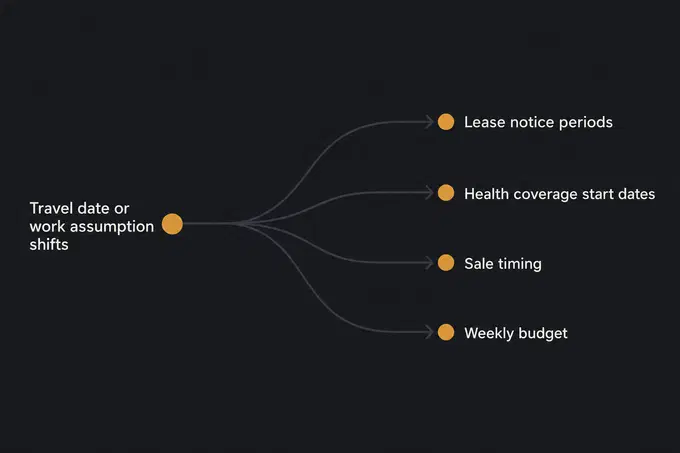
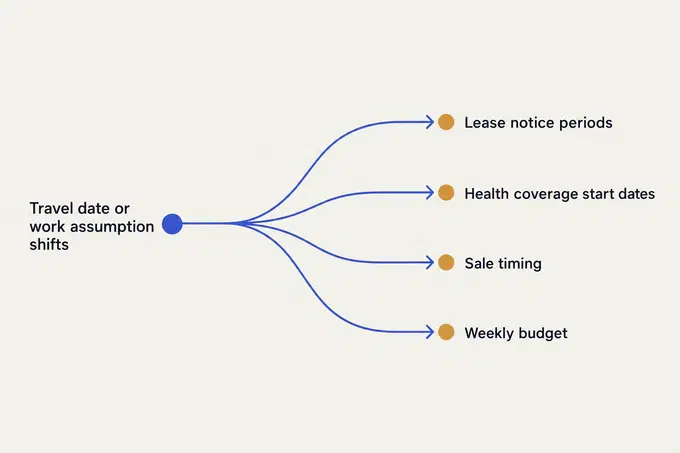
When my partner and I planned our move from Melbourne to Washington DC, my main goal was to take some of the mental load off her plate. An international move is dozens of problems that depend on each other: ending a lease, finding a new home, work and income, health coverage, identity documents, tax, shipping, and selling what you cannot take. The hard part is keeping all those moving parts on track while unknowns change the plan and the timeline. When a travel date or work assumption shifts, it ripples into lease notice periods, insurance start dates, sale timing, and the cash you need in a given week.
Relocation Playbook: an AI chief of staff for an international move
Moving internationally meant juggling dozens of changing plans, adapting as they changed, and staying on the same page with my partner. I knew it would be complex, so I set up Claude Code as an AI agent and household chief of staff to keep our tasks, research, and weekly check-ins in one place.
stack
Markdown files · Claude Code · Notion · Calendar
span
2026 · 6 months
status
complete
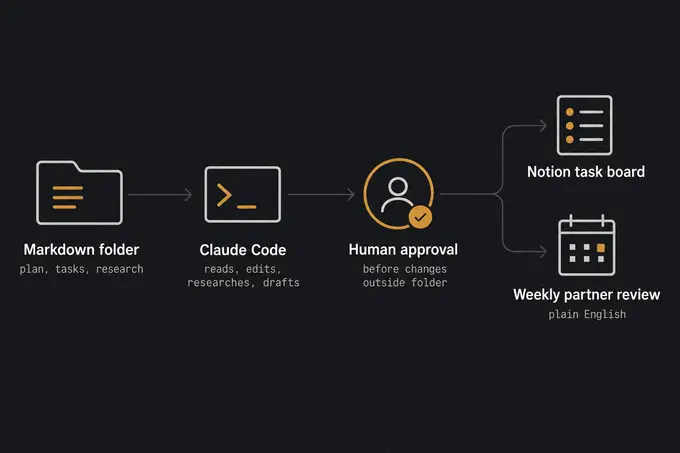
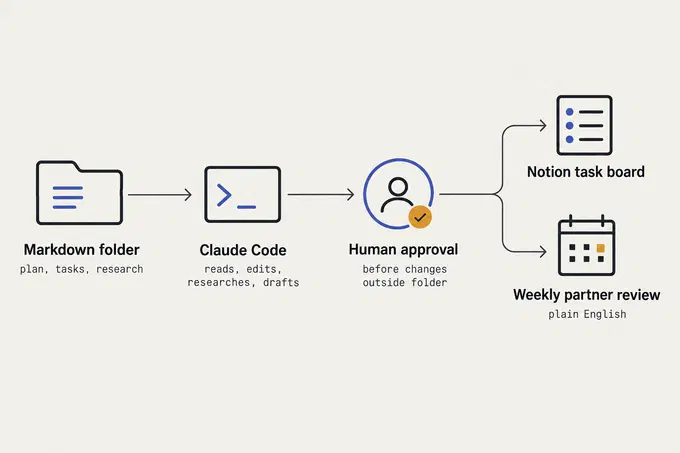
I didn't build an agent from scratch. I set up Claude Code, Anthropic's AI coding assistant that reads and edits files in a folder, to act as a household chief of staff. It worked from a folder of markdown files, which are simple text files with light formatting. Later, I turned the method into Relocation Playbook, an open-source kit with a process case study, both using fictional examples.
I designed the setup so only I had to drive the tooling. My partner is less technical, does not use Notion, and has her own way of staying organised. I tried to fit the system around her so she could join our reviews in plain English without ever seeing a file name or a prompt.
The first step was working with the agent to document every part of the move. It collected details from me so it could cater the plan to our situation and prioritise tasks against our timeline. Once that structure was in place, we adapted the plan over time in our weekly sessions. It helped us see things we would not have thought of, while we kept control: we could add or remove anything we decided was not necessary or could be addressed later.
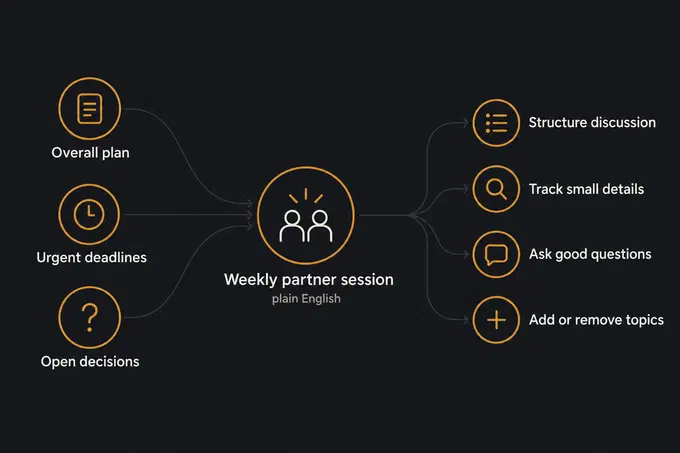
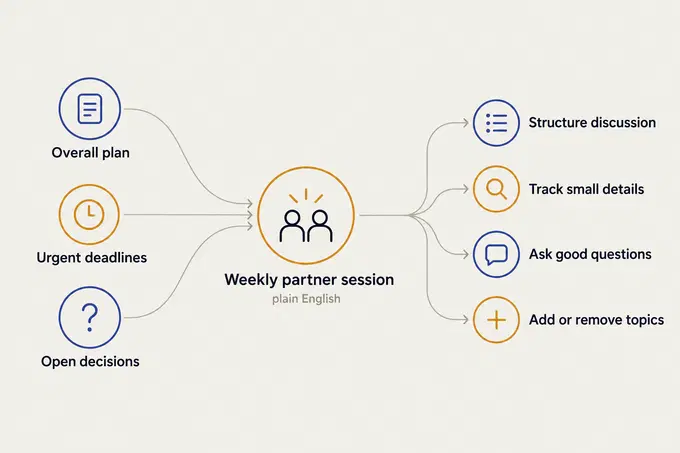
Our centrepiece was a goal to meet weekly as a couple. Before each review, the agent built our session agenda from the overall plan and from whatever was most urgent to act on or decide. This was my favourite feature. We did not follow the agenda 100%, and we did not manage to meet every single week. Even so, it structured our discussions, kept us on top of small details, asked good questions, and did background research that would have taken us a long time on our own.
Then the plan shifted. We booked our flights and my partner lined up a job, so instead of waiting on events we were working back from a fixed departure date, while work and coverage assumptions kept changing. Under that pressure, the first setup broke in three ways:
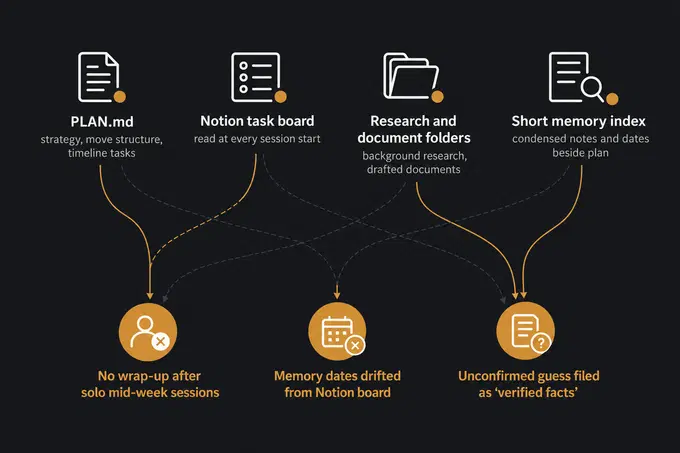
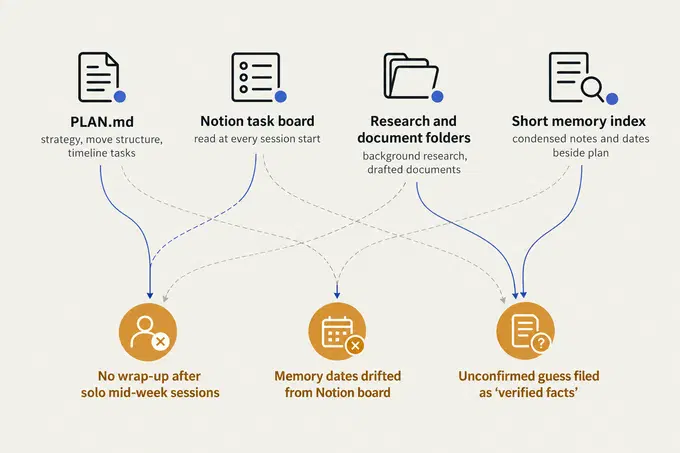
- A stale shared agenda. The shared agenda only updated after our weekly reviews. When I ran solo sessions mid-week, the plan changed without a wrap-up step, so the agenda for our next sit-down was already behind.
- Scattered facts and slow starts. Dates in the memory index drifted away from the Notion task board. Worse, the agent had to read the task board page by page at the start of every session, which was slow and costly.
- Overconfident labels and conflicting rules. A file named 'verified facts' held an unconfirmed guess. My instructions also contradicted themselves on when the agent needed permission to edit files, and its own gap audit once reported a topic as missing when earlier notes had simply covered it lightly.
To fix this, I rebuilt the system around structured memory, meaning small markdown files where every fact, deadline, and decision follows a strict template in a state/ folder, governed by one approval contract in AGENTS.md. That folder became our single source of truth, the one place every summary and agenda was built from.
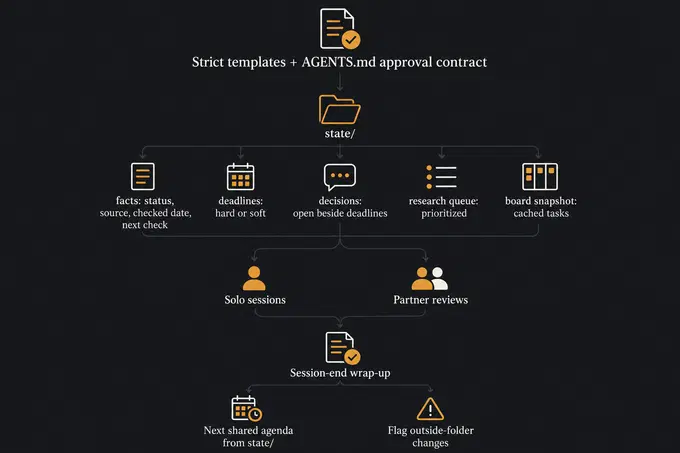
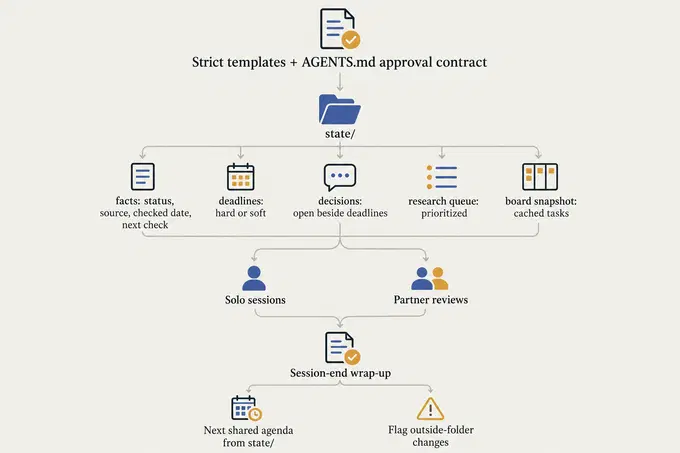
In the new setup, each fact records whether it is confirmed, an assumption, or a recommendation, alongside its source, the date it was checked, and a date to check it again. Deadlines are marked hard (legal or booked) or soft (self-imposed), sitting next to open decisions, a prioritised research queue, and a cached snapshot of the task board for fast starts. Most importantly, the session-end workflow now runs after every session, solo or shared. It builds the next shared agenda straight from those records instead of from conversation memory, and it flags anything outside the folder that it did not update.
What I learned
The biggest lesson was that prose copies of a fact drift as an AI system summarises and rewrites them across turns, while a single structured record per fact gives the model a clean source of truth to ground its output. When the first check ran after the redesign, that grounding paid off: it caught a wrong date and some missing obligations, and the research queue produced two new research files. Still, better markdown files only reduced the chance of context drift because language models regenerate state rather than computing it. Later snapshots held retired tasks, a marked duplicate, and a summary that disagreed with its own category counts.
I also saw how unreliable AI self-evaluation can be. An AI system tends to overstate gaps or miss stale state when asked to audit its own work, so I learned to check its reviews against older evidence. Because everything ran only while I was in the conversation, the system had no background loop of its own. Keeping a human in the loop was not a fallback: someone always had to look.
If I built a next version to make a system like this more reliable, I would turn the ideas I sketched out, but never built, into real guardrails:
- Scheduled morning checks and weekly runs that read the state files outside of live sessions, prepare a review brief, and send a nudge when a deadline or verification date is due.
- Automated validation and single-writer enforcement in code rather than by convention, so a summary cannot disagree with its own category counts and retired or duplicate tasks get flagged at session close.
- Recurring red-team audits that test the plan against a pre-mortem checklist once a month, paired with a rule to verify any claimed gaps against existing records.
- A text-message capture channel so another household member can log updates into a dated file without opening a full session.
outcome
Step-by-step routines the AI agent follows 8 workflows — how this was measured
These eight repeatable routines cover the work of a move: jotting down new tasks, sorting the to-do list, researching options, drafting documents, adjusting dates when a big event happens, writing a weekly summary, and opening and closing each planning session. One rule governs all of them: human approval before changes are made outside the folder.
How the system separates real facts from guesses 3 confidence tiers — how this was measured
Every fact is labelled confirmed, an assumption, or a recommendation, alongside where it came from and when to check it again. I added this after a guess showed up inside a file called 'verified facts', and the first check with the new labels caught a wrong date and some missing tasks.
reflection
The system helped me stay on top of a complicated move, though my attempts to build it for my less technical partner were not quite a home run. I set up a Notion board and plain-language summaries so she would never have to touch the AI tooling. The small catch is that she had never used Notion before and already had her own perfectly good way of staying organised. Our weekly agendas still gave us a calm way to talk through decisions together, even if I remained the only true fan of the task board.